Part of our Records guides
Blog
Right to Work Share Code: Employer Responsibilities Guide
Last updated:
A right to work share code only starts the check. Employers must run it on the Home Office service, match the photo, confirm permitted work and keep the profile page.
 By Babar Kamal · Product/Engineering Lead7 min read
On this page
- Understanding employer responsibilities for share codes
- What must an employer do with a right to work share code?
- Understanding the code and choosing the correct checking route
- Completing the online check before work starts
- Reading restrictions and keeping useful right to work evidence
- When should employers repeat a right to work code check?
- What if a share code fails or cannot be provided?
- Keeping checks consistent and fair
- The practical takeaway
Understanding employer responsibilities for share codes
A right to work share code lets an employer view an individual's immigration-based work permissions through the Home Office online service. Your responsibility is to complete the prescribed check before employment starts, confirm the person's identity and permitted work, and retain the result. Simply collecting the code is not enough. This guide explains the checking process, the evidence to keep and how to handle follow-up checks or problems. It is general compliance information, not immigration or legal advice. Always read it alongside the current GOV.UK guidance on checking a job applicant's right to work.
What must an employer do with a right to work share code?
An employer must use the individual's share code and date of birth in the official employer checking service, check that the photograph matches the person, confirm that the proposed work is permitted, and securely retain the resulting profile page. Receiving a code by email, or seeing an applicant's own immigration status screen, does not complete an employer's right to work check.
The distinction matters because a correctly completed check can establish a statutory excuse: a defence against a civil penalty if someone is later found to be working illegally. That protection depends on following the prescribed process, including any required repeat checks. It is not a substitute for acting on information showing that someone cannot lawfully do the work.
Treat the check as an onboarding decision, not an administrative task to finish after the first shift. Assign responsibility to a named person and make completion visible to whoever authorises the start date. Software such as right to work check software can help keep that ownership and status visible.
Understanding the code and choosing the correct checking route
A UK right to work share code is a nine-character code beginning with W. It is valid for 90 calendar days and can be used more than once during that period. Codes beginning with R or S serve other purposes and cannot be used for an employer's right to work code check.
The code provides access to information. It does not grant permission to work. Its expiry date is therefore different from the date someone's immigration permission ends. If the code expires before you use it, ask the individual to generate another rather than assuming their work permission has expired.
Not everyone can provide a share code. British and Irish citizens cannot obtain one to prove their right to work, so employers must use an appropriate document check or an eligible digital verification route instead. People with an eVisa must have their status checked through the Home Office online service to establish a statutory excuse.
Situation | Usual checking route |
|---|---|
Individual holds a digital immigration status (for example an eVisa) | Online check using a share code beginning with W |
British or Irish citizen | Manual document check or eligible digital identity verification |
Online check cannot be completed because of an eligible outstanding application or technical problem | Employer Checking Service |
Explain the relevant route when you request evidence of the right to work in the UK. A blanket instruction that every applicant must submit a share code will exclude people who need a different, valid checking method.
Completing the online check before work starts
To check an employee's right to work using a share code, use the employer-facing GOV.UK service rather than the individual's account. Have the proposed role and working arrangements to hand so you can compare them with the result.
Follow this practical sequence:
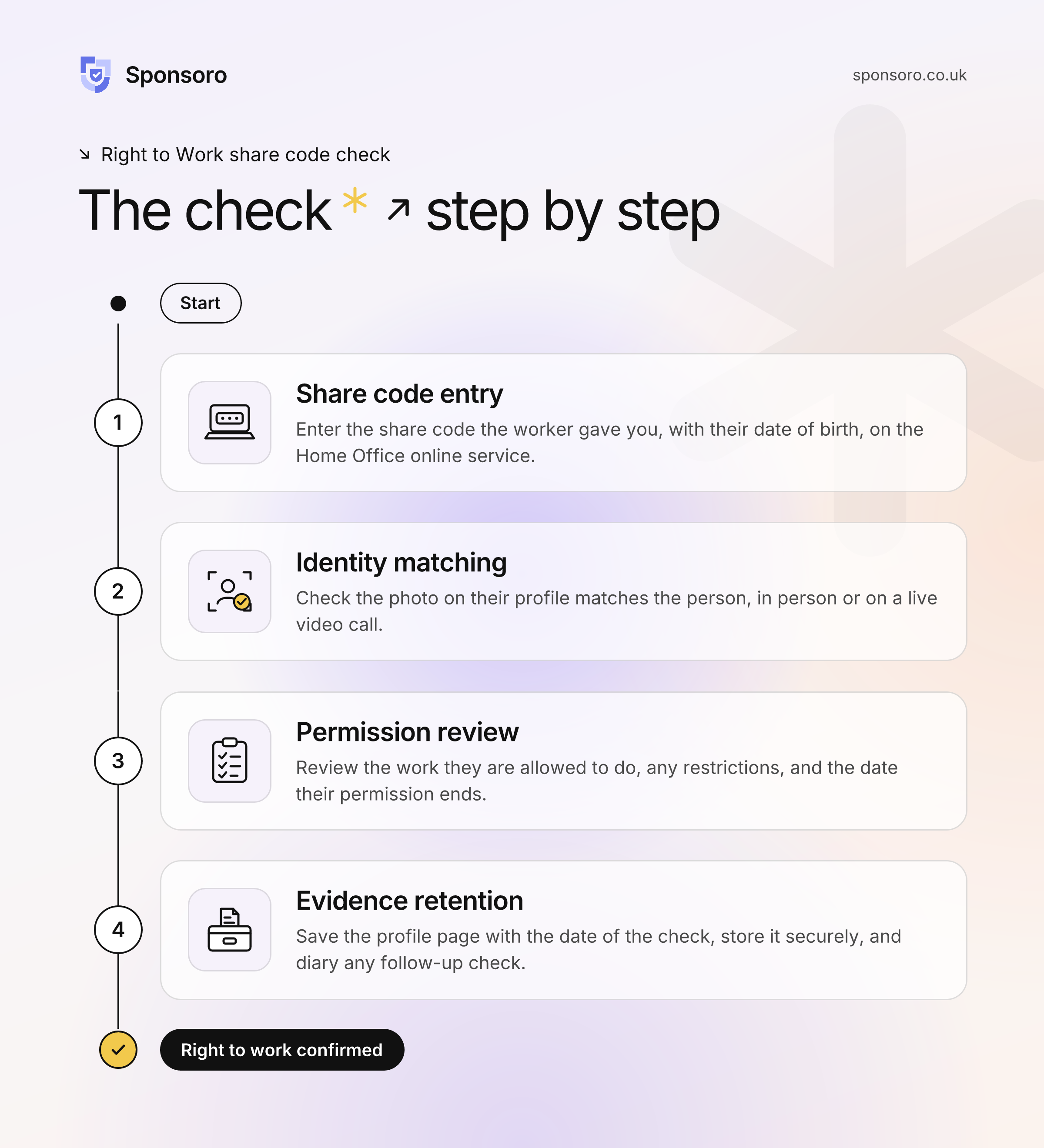
Collect the details. Ask for the right to work share code and the individual's date of birth.
Access the official service. Enter those details and record your employer or business name correctly and in full.
Match the person to the photograph. Compare the service photograph with the individual, in person or on a live video call.
Read the complete result. Check whether the person may do the work offered, including restrictions on hours, occupation or role.
Save the profile page. Retain the output showing the photograph and check date, then record any follow-up action.
If you use facial recognition technology for the identity comparison, the current guidance requires a registered Right to Work digital verification service provider. Keep its comparison alongside the required checking output. Do not assume that any identity-checking app meets the prescribed requirements.
For your internal checklist, separate "code received" from "check completed". That small distinction makes it harder for an unfinished task to look like an approved start. Our right to work recheck calculator can help you plan the next check once you know the relevant expiry date.
Reading restrictions and keeping useful right to work evidence
A result confirming some permission to work is not necessarily approval for every job. Employers must ensure the actual employment complies with the restrictions displayed, including any limits on working hours or the type of work. Read the conditions before approving the role, not just the headline status.
For example, if the result limits working hours, compare that condition with the proposed rota. Give the manager responsible for scheduling the information needed to respect the restriction. Build a review into your role-change process so that a different position or working pattern prompts a fresh look at the recorded conditions.
The required online right to work evidence is a securely stored copy of the profile page, including the photograph and the date of the check. Keep it for the duration of employment and for two years after employment ends, then securely destroy it. A saved code alone is not the required checking record.
Make that evidence usable as well as available. Consider recording the checker's name, the role reviewed, any restrictions and the next review date alongside the official output. Limit access to staff who need it, and use a consistent filing convention so an authorised colleague can find the record without searching through recruitment emails. A dedicated compliance evidence management tool can keep records consistent and access controlled.
When should employers repeat a right to work code check?
Where a check establishes a time-limited statutory excuse, employers must complete a follow-up check before that protection expires. Use the permission and follow-up information in the checking result, not the share code's 90-day validity, to plan the deadline. Some results confirm a continuous right to work and state that another check is unnecessary.
Create a reminder early enough to speak with the worker and resolve questions before the relevant deadline. Give the task an owner and a backup, rather than relying on one person's calendar. Keep the new checking output alongside the previous record so the sequence is clear.
Avoid applying one blanket rule to every immigration category. Follow the current Home Office guidance and the instructions attached to the individual result. Where an application is pending or the position is unclear, establish the appropriate verification route rather than guessing whether permission continues.
What if a share code fails or cannot be provided?
A failed share code check does not, by itself, establish that someone has no right to work. Check for an expired code, incorrect details or a code generated for another purpose. Where the person cannot demonstrate their status because of an eligible outstanding application or a technical problem, the Employer Checking Service may be the appropriate route.
Use a consistent escalation process:
Confirm the basics: check the code and date of birth with the individual, without asking for their account password.
Clarify the problem: distinguish an input error from an unavailable digital record or a pending application.
Check eligibility for verification: consult the Employer Checking Service guidance and gather the information it requests.
Record the outcome: retain the relevant result and set any required follow-up date.
A Positive Verification Notice can establish a statutory excuse for six months from the date specified in the notice. Follow its conditions and arrange the next check before that protection expires. For an existing worker with an unresolved position, obtain case-specific advice before making an employment decision.
Keeping checks consistent and fair
Apply right to work checks consistently rather than selecting people because of their name, accent, appearance or perceived nationality. Do not insist on the same evidence from everyone. Lawful checking routes differ, and applicants should have a reasonable opportunity to demonstrate their entitlement.
Use a standard request explaining why evidence is needed, which routes may apply and whom to contact for help. Train recruiting managers not to promise a start before the checking decision is complete. If recruitment software labels a field "share code right to work", consider adding instructions for applicants who cannot use that route.
If you hold a sponsor licence, right to work checks sit alongside your wider duties. Keep them connected to your sponsored worker management records so that checks, restrictions and review dates are not held in separate places.
The practical takeaway
Handle a right to work share code as the beginning of verification, not the finished result. A dependable process connects the official check, identity match, permitted work, retained evidence and any follow-up deadline.
Review a sample of onboarding records against those stages. Correct missing steps, clarify ownership and keep the current Home Office employer guidance available to the people making hiring decisions.